CoreCredit

Now available on the App Store

Know what your cores are still worth.

CoreCredit is a core charge ledger for independent repair shops. Log the charge when the part comes in, get the old unit back to the right vendor before the window closes, and keep the money counted until the credit actually lands.

  • iPhone and iPad
  • Works with no signal
  • No account to create
  • Free for your first five open cores
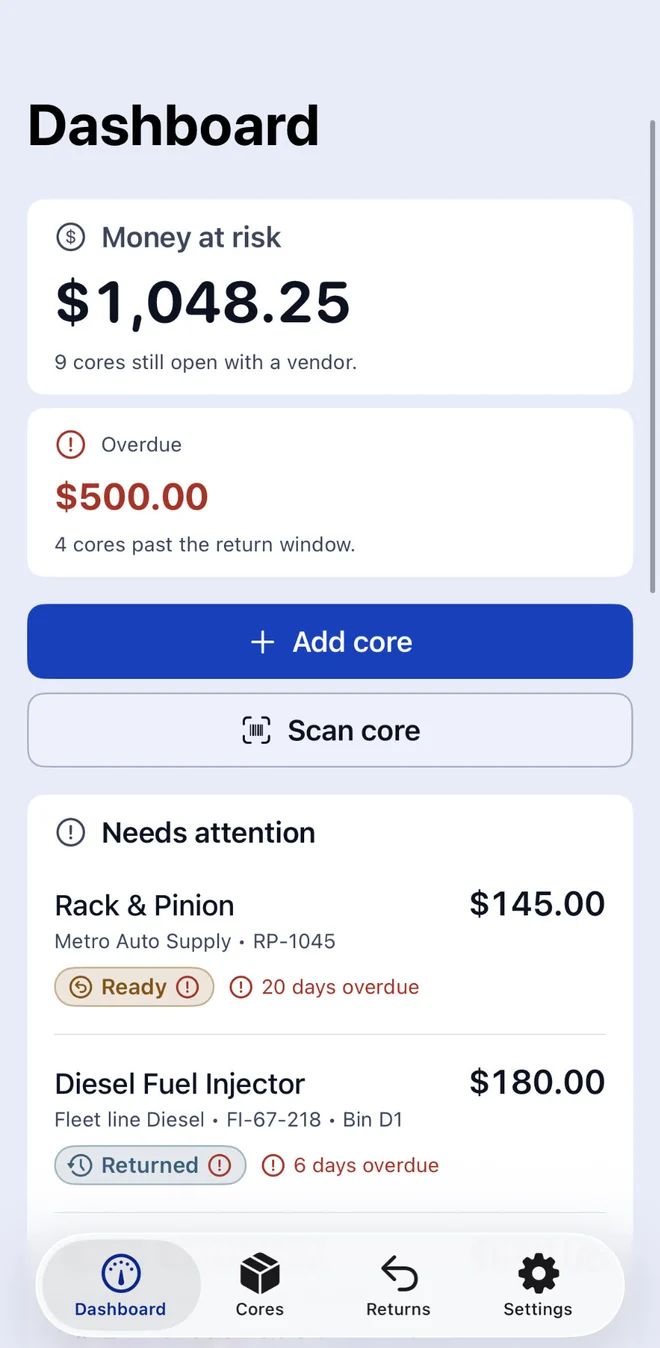
The CoreCredit dashboard: $1,048.25 of money at risk across 9 open cores, $500.00 of it overdue, and a Needs attention list showing a Rack & Pinion 20 days overdue.
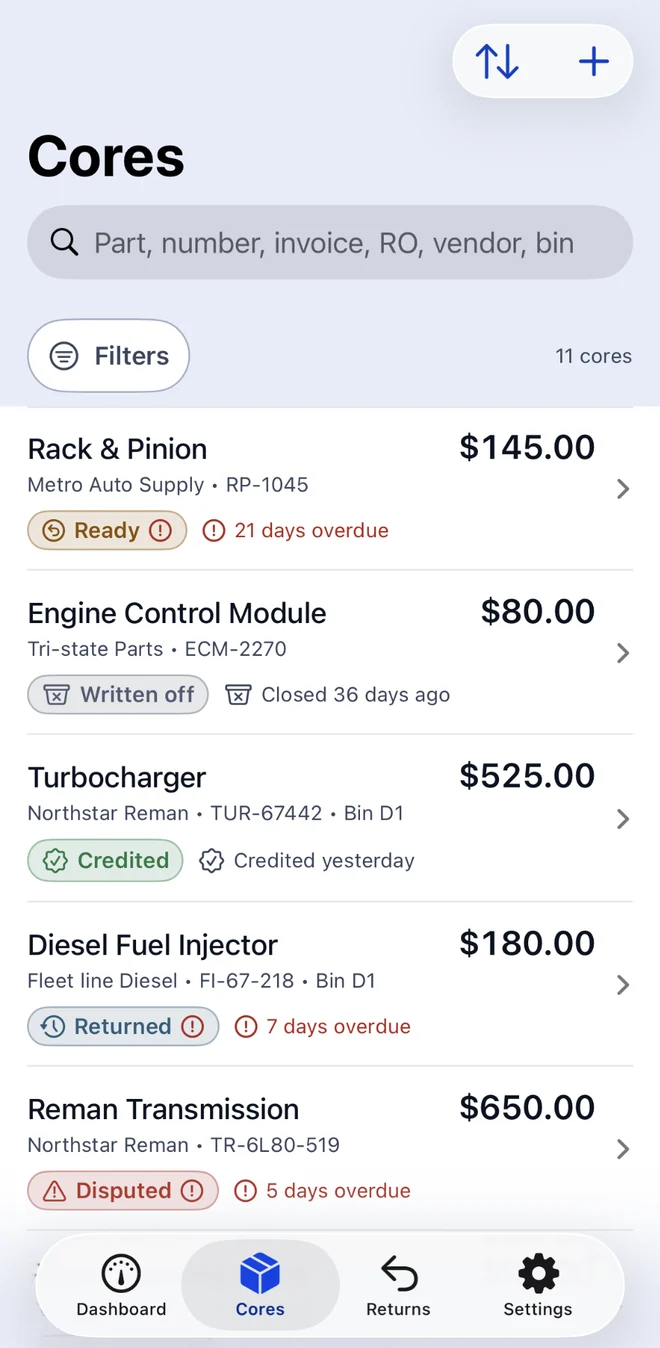
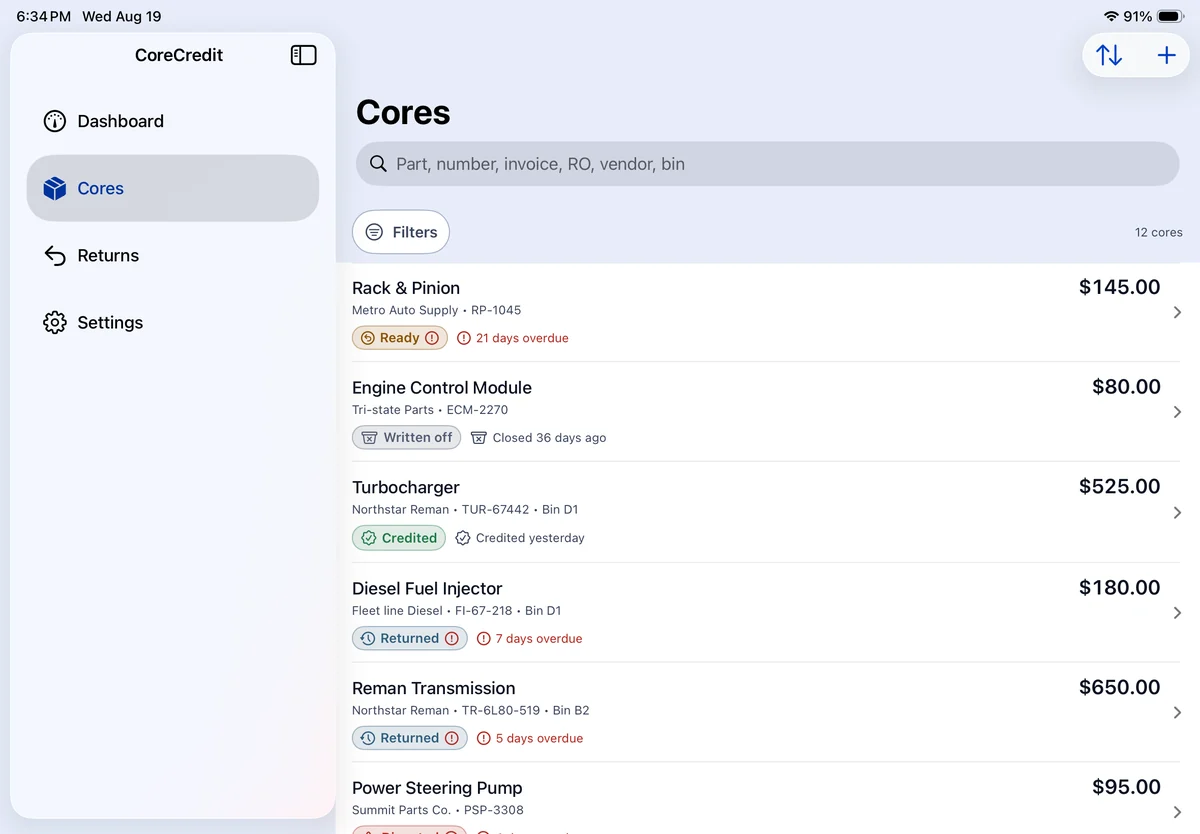
The Cores list: eleven cores with their vendor, part number and status badges — Ready, Written off, Credited, Returned and Disputed.
Built for small shops
One to five bays. Auto, diesel, collision and equipment repair.
Everything stays on the device
No account, no sign-in, no server of ours holding your records.
No trackers, ever
No analytics, no advertising SDK, nothing phoning home.
Yours to take with you
CSV and JSON export, and a backup file you can restore.

The problem

Returned is not the same as credited.

A core charge is refundable money your shop has already paid. It comes back only if the old unit reaches the right vendor before the window closes — and only once that vendor actually issues the credit. The gap between those two events is where the money quietly goes missing.

CoreCredit keeps a core counted as money at risk from the day the charge is logged until a real credit is recorded against it. Handing the part to the driver does not settle it. That single rule is the whole product.

How it works

Four steps, from the invoice to the credit memo.

  1. Log the core charge

    Part, vendor, and the refundable amount printed on the invoice. Scan the barcode or type it in. The vendor's return window sets the due date for you.

  2. Mark it ready

    The old unit is boxed, tagged and in its bin. Add a photo of the label or the receipt if you want the evidence attached to the record.

  3. Send it back in a batch

    Cores group by vendor, so one driver pickup is one return batch with one reference number. The core moves to returned — awaiting credit, still counted.

  4. Record the credit

    Enter what the vendor actually credited. Matches in full, it closes. Comes back short, CoreCredit flags the shortfall and opens a dispute you can export.

Features

A ledger that argues your case for you.

One number that tells you where you stand

The dashboard opens on total money at risk, how much of it is already past the return window, and the specific cores that need a hand today — newest problem first, with the days overdue spelled out.

  • Money at risk — every unresolved core, added up.
  • Overdue — what has already blown its return window.
  • Needs attention — the queue to work through.
Dashboard showing Money at risk of $1,048.25 across 9 open cores, $500.00 overdue on 4 cores, and Add core and Scan core buttons.

Short credits stop being somebody else's problem

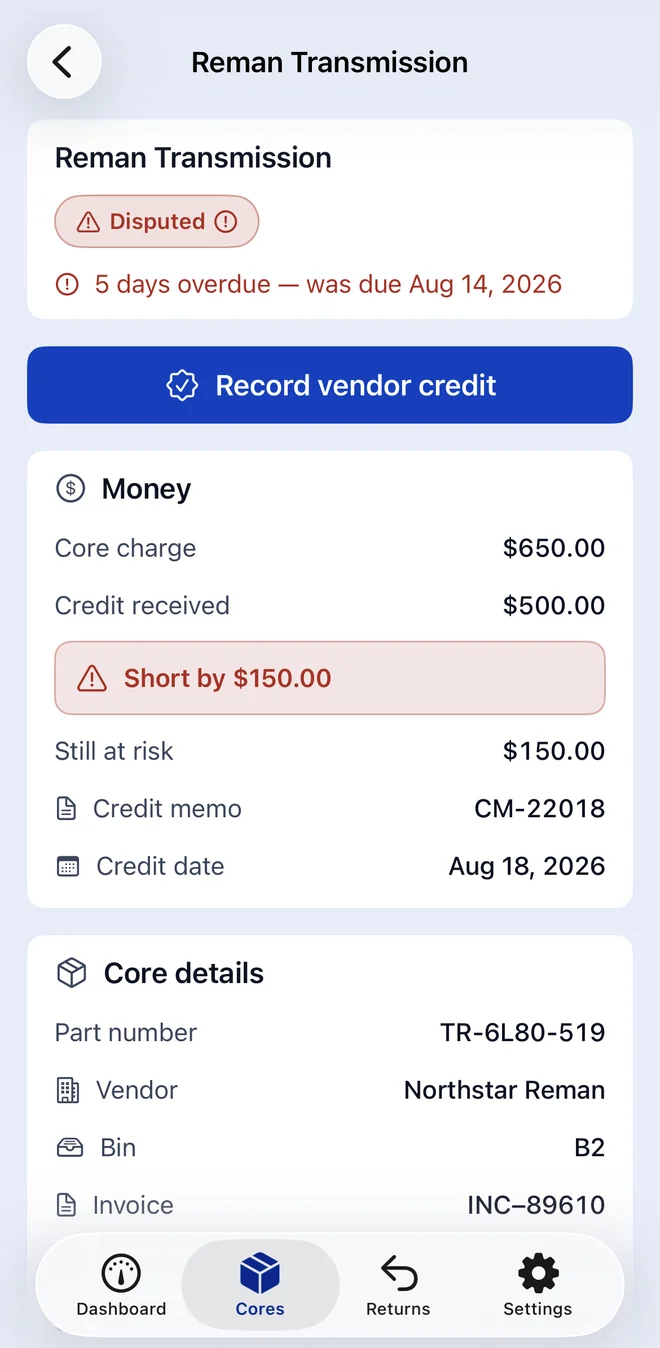
Record what the vendor actually paid. If it is less than the core charge, CoreCredit does the subtraction, marks the core disputed, and keeps the balance in your exposure — with the credit memo number, the credit date and the original invoice sitting right there when you call the counter.

  • Expected against received, with the shortfall on its own line.
  • Part number, vendor, bin, invoice and repair order on one screen.
  • Export a dispute packet as a PDF through the standard share sheet.
A Reman Transmission core marked Disputed and 5 days overdue: core charge $650.00, credit received $500.00, short by $150.00, with credit memo CM-22018 and the core details below.

Returns batched the way the driver actually picks them up

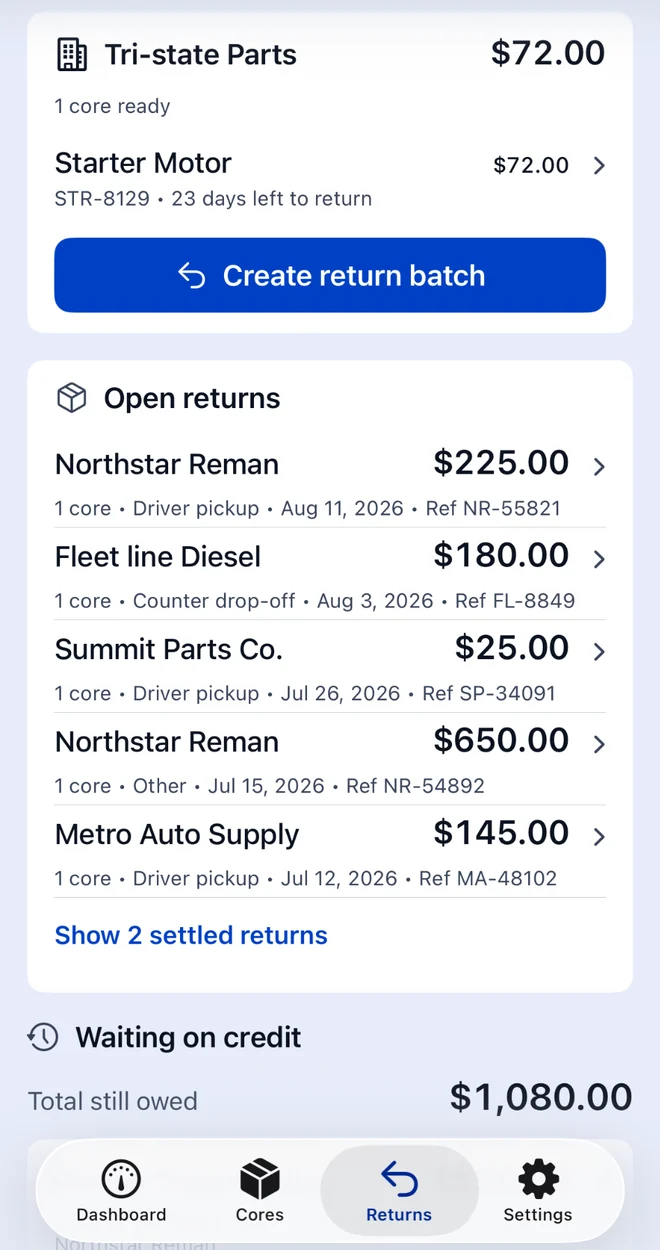
Cores that are ready group themselves by vendor. Build the batch, keep the return reference, and the open returns list shows what each vendor is still holding and what the total owed adds up to.

  • One batch per vendor pickup, with its own reference.
  • Driver pickup, counter drop-off or your own note on how it went back.
  • A running total of everything still waiting on a credit.
The Returns screen: a Tri-state Parts group with one core ready and a Create return batch button, then open returns for five vendors and a total still owed of $1,080.00.

The rest of it

Everything below runs on the device, and every field can be typed by hand if you would rather not point a camera at anything.

Scan the box, not the paperwork

Live mode reads barcodes and highlights printed text for you to tap. Document mode flattens a whole invoice. Both run on device, and neither writes a record on its own — everything lands as a suggestion you confirm.
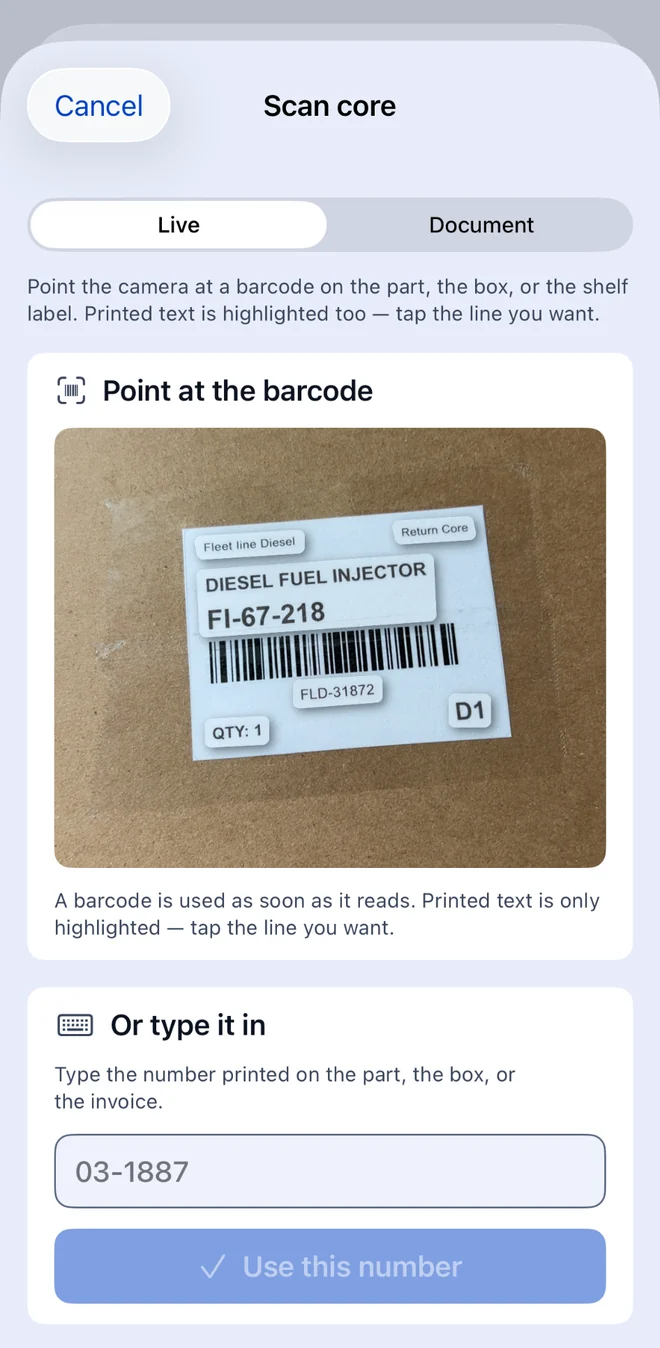
The Scan core screen with Live and Document modes, showing a camera view of a core return label with a barcode, and a manual entry field below it.

Intake that takes seconds

Part, vendor, expected credit. References, bin, evidence photos and notes stay folded away until you want them. The vendor's return window fills in the deadline.
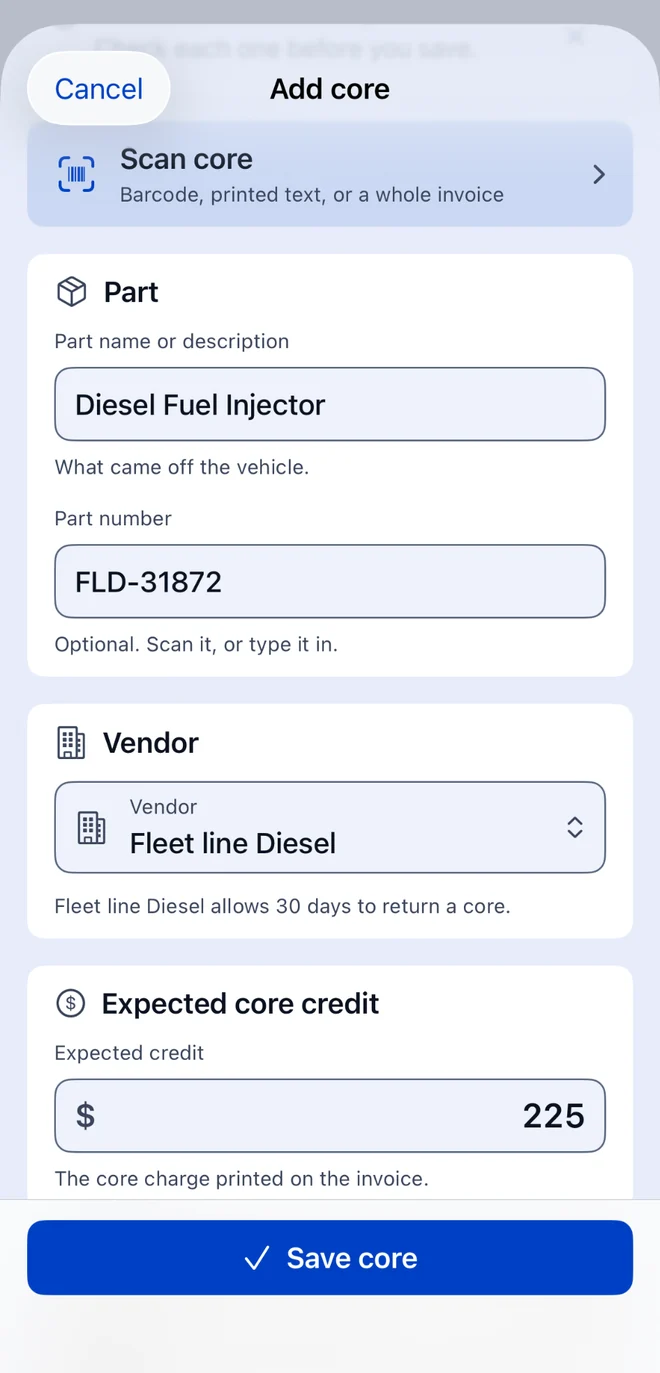
The Add core form: part name Diesel Fuel Injector, part number FLD-31872, vendor Fleet line Diesel with a 30-day return window, and an expected core credit of $225.

A timeline you can hand to anyone

Every core keeps an append-only history: created, edited, photographed, status changed, batched, returned, credited — each with its amount, its reference and its timestamp. Nothing is rewritten after the fact.
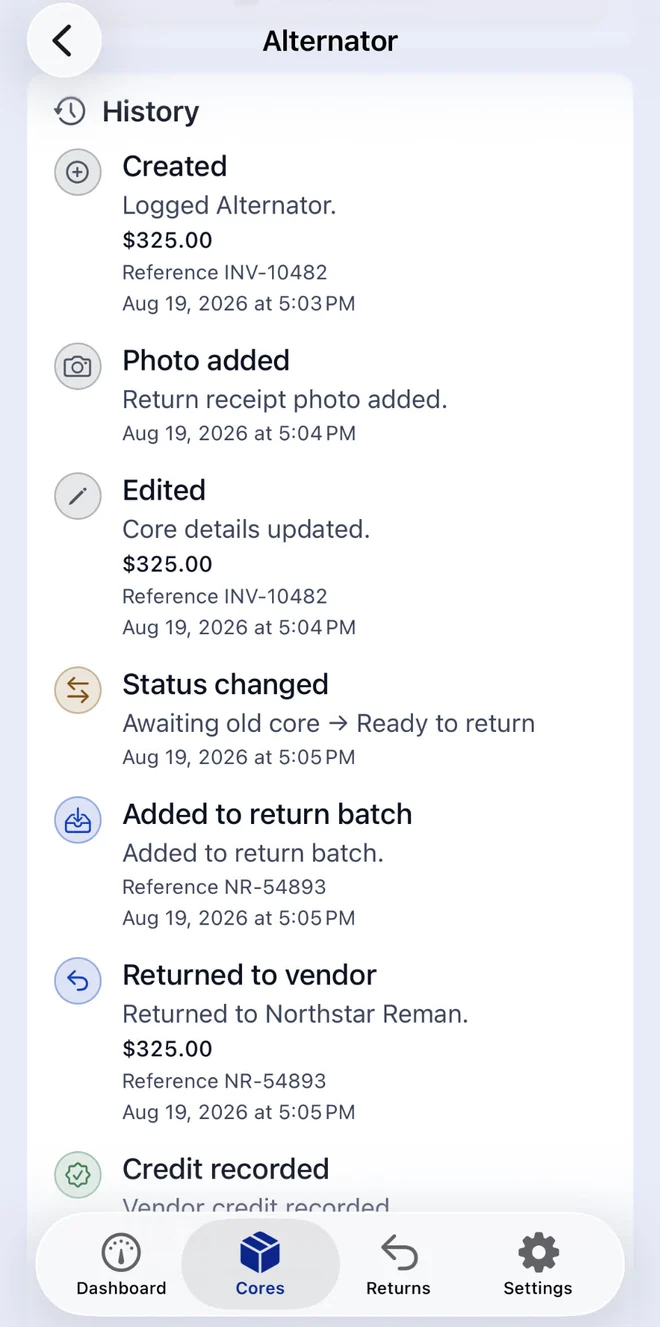
The history of an Alternator core: created, photo added, edited, status changed to ready to return, added to a return batch, returned to Northstar Reman, and credit recorded.

Deadline reminders

Turn on notifications and CoreCredit tells you before a return window closes rather than after. Off by default, and never required to use anything else.

Search and filter that keeps up

Find a core by part, part number, invoice, repair order, vendor or bin. Filter by status when you want to see only what is overdue, only what is ready, or only what is still in dispute.

Export, back up, move on

A spreadsheet for the office, a JSON backup for a new phone, a dispute packet for the vendor. Restore reads a backup this app wrote and tells you exactly what it is about to replace before it does it.

On the counter too

Runs on the iPad at the front desk.

The same records, laid out for a bigger screen: a sidebar for Dashboard, Cores, Returns and Settings, and the full list beside it. Nothing to sync and nothing to sign into — each device keeps its own ledger.

Requires iOS or iPadOS 18 or later.

CoreCredit on iPad in landscape: a sidebar listing Dashboard, Cores, Returns and Settings beside the full Cores list with status badges and amounts.

Start free. Upgrade when the board fills up.

Nothing you have already logged is ever locked away, on either plan.

Free

Up to five unresolved cores at a time.

  • Credited and written-off cores stop counting, so settling one frees a slot.
  • Full dashboard, returns, scanning, photos and history.
  • Everything you have logged stays viewable, editable and exportable.

Questions

Before you download.

Who is CoreCredit for?

Owner-operated one-to-five-bay shops — auto, diesel, collision and equipment repair — that do not have usable core tracking in an expensive shop-management suite. If your core log is a clipboard, a whiteboard or a shoebox of invoices, this is built for you.

Does it need an account or an internet connection?

Neither. There is no sign-in and no server. Put the phone in Airplane Mode and every feature still works except buying a subscription, which goes through Apple.

Where does my data live?

On your device, and nowhere else. We do not receive it, and there is no analytics or advertising code in the app to send it anywhere. Export a CSV or a JSON backup whenever you want a copy, and see the Privacy Policy for the details.

Do I have to scan anything?

No. Scanning is a shortcut, never a requirement — the manual entry field is on the scan screen in every state, including when the camera is unavailable or you have declined access. The camera is only ever asked for after you open Scan core yourself.

What happens when I hit the free limit?

Creating a sixth unresolved core asks you to upgrade. That is the only thing the limit blocks. Everything already in the app stays fully available to view, edit, photograph, credit and export, and closing a core out — credited or written off — frees the slot again.

Does it replace my shop management system?

No, and it is not trying to. CoreCredit is not a repair-order system, an accounting product or an inventory manager. It does one narrow financial job: tracking refundable core money until it comes back.

Where is it available?

Version 1 is offered on the United States App Store, for iPhone and iPad running iOS or iPadOS 18 or later.

How do I get help?

Email support@idlery.com. That address reaches the people who make CoreCredit. The support page also lists the things worth trying before you wait on a reply.

Stop guessing what the vendors still owe you.

Log one core tonight and the dashboard will tell you the number tomorrow morning.

Download CoreCredit on the App Store